
Authors
Daniel Roßner
Claus Atzenbeck
Full text
Late Breaking Result HT ’21, August 30–September 2, 2021, Virtual Event, Ireland
Daniel Roßner∗
Claus Atzenbeck daniel.rossner@iisys.de claus.atzenbeck@iisys.de Hof University Institute of Information Systems Hof, Germany
Abstract
by many hypertext researchers came back to the Web ecosystem, including public authoring (e.g., via Wiki or social media), dynamic content (via CMS, e.g., WordPress) or annotations (e.g., via Annotea) [5]. Mostly, however, these features were not baked into the protocols or the browsers, but only available within the respective Web service. Weblinks is a Web browser plugin, still under development, which allows its users to create links on arbitrary Web pages. The technical details are described in [6]. Similar to Hypothesis1, which implements “a conversation layer over the entire web”, Weblinks offers a linking layer over the Web. Links, in this case, may have any arity and feature unidirectional or bidirectional endpoints. In the following sections, we discuss scenarios in which Weblinks may be beneficial, and its limitations as well. Furthermore, we demonstrate how the plugin looks like, how users can interact with it, and our plans for future improvements and development.
Modern browsers, as we know them from the Web, are used to query and present a variety of different resources. This usually happens by traversing links (i.e., URIs) in hypertext documents. The creation of new links however, is impossible to ordinary users, because they usually are recipients, but not owners of the received resource. In this paper, we demonstrate a browser plugin called ‘Weblinks’, which offers its users an additional and rich linking layer over the existing Web. This enhances the notion of links as strings (i.e., URIs) in today’s Web context to links as rich objects (𝑛-ary, unidirectional, or bidirectional), which can be created, traversed or shared by anyone using the Weblinks browser plugin.
Ccs Concepts
• Human-centered computing →Hypertext / hypermedia; • Information systems →World Wide Web.
Keywords
hypertext, navigational hypertext, link service, Web, browser, Weblinks
1 Introduction
Creating or traversing links of associated information is the foundation of most hypertext systems or applications. Often we distinguish between authoring and reading hypertext [e.g., 2, 5]. Sometimes both happen at the same time [e.g., 1]. These different perspectives on hypertext have changed over time: The first Web browsers, for example, allowed the owner of a document the creation of links. Some years later, in the mid 1990s, this feature disappeared in most major Web browser [3]. With the Web 2.0, many features missed
∗Corresponding author
Permission to make digital or hard copies of part or all of this work for personal or classroom use is granted without fee provided that copies are not made or distributed for profit or commercial advantage and that copies bear this notice and the full citation on the first page. Copyrights for third-party components of this work must be honored. For all other uses, contact the owner/author(s). HT ’21, August 30-September 2, 2021, Virtual Event, Ireland © 2021 Copyright held by the owner/author(s). ACM ISBN 978-1-4503-8551-0/21/08. https://doi.org/10.1145/3465336.3475123
This work is licensed under a Creative Commons Attribution-NonCommercialNoDerivs International 4.0 License.
HT ’21, August 30–September 2, 2021, Virtual Event, Ireland. © 2021 Copyright held by the owner/author(s). ACM ISBN 978-1-4503-8551-0/21/08. https://doi.org/10.1145/3465336.3475123
283
2 Weblinks Features
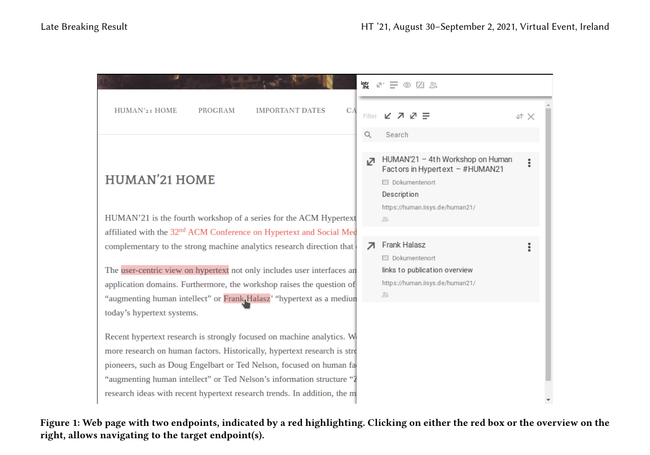
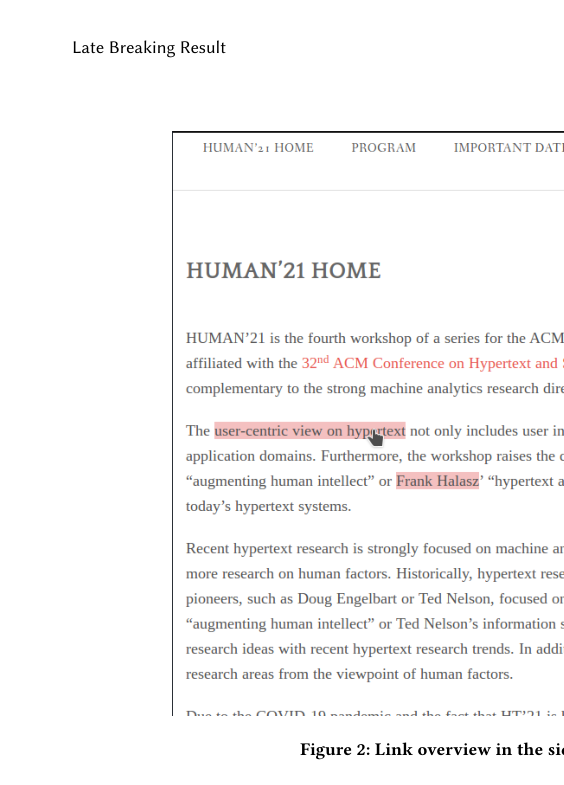
Weblinks comes as a plugin for Mozilla Firefox and Chromiumbased browsers, like Google Chrome or Microsoft Edge. It adds some JavaScript to the visited Web pages which allows selected text to be used as an endpoint of a link. An expandable sidebar on the right shows already created endpoints (received from a link base) and adds basic functionality to edit, delete, or filter endpoints. An example is given in Fig. 1, where the sidebar gives an overview of all endpoints on the current page. On the page itself, these endpoints are highlighted in red. Endpoints are part of a Web resource, usually a text range, which serves as a link anchor. Similar to the Dexter Hypertext Reference Model [4], a link is built by an arbitrary number of endpoints (𝑛arity), which themselves may limit the direction of traversal (‘from’, ‘to’, ‘from and to’). Unfortunately, endpoints have limited resistance against structural changes on Web pages, for example, added content banners or changing ads. Clicking on endpoints (either directly within the content or in the sidebar) opens a list with all traversable endpoints of the common link (see Fig. 2). If there is only a single traversable target endpoint, the corresponding page is opened immediately in a new tab. Social features are yet mainly under development, but will take a prominent role in upcoming versions of the Weblinks application. Then, groups of users may share their links, for example, to build up a common knowledge of a project team. A global context allows sharing links with anyone. In contrast to Hypothesis, we do not implement a conversation layer that supports comments
1https://web.hypothes.is/
Late Breaking Result HT ’21, August 30–September 2, 2021, Virtual Event, Ireland
HT ’21, August 30-September 2, 2021, Virtual Event, Ireland Atzenbeck and Roßner
or discussion threads. Therefore, social interactions in Weblinks are limited to sharing links and their endpoints. For convenience, the plugin supports the creation of annotations implemented as metadata associated to endpoints. As such, they are attached to a part of the Web resource and can be shared with others.
3 Weblinks Application
Weblinks enable users to store their associations directly on Web pages while browsing the Web. A recent project, for example, adapts the plugin to be used in the context of legal texts and commentaries. Such that it is possible to actually link such texts with other caserelated documents and making these links available for co-workers. As the plugin does not require any write-access to linked resources, third party Web services can be used without any special technical integration. Another currently examined use case is the use of Weblinks in teaching. For example, lecturers can create trails of interlinked documents to guide the students. Students, in turn, can augment these documents with their own associations and share them with others. All application scenarios have the creation and traversing of links in common. An important design goal was to keep this process as simple as possible. As links are more complex than what most laypeople are used to, we implemented defaults, which ‘just work’ in most cases. The sidebar is only needed when users want to deviate from the defaults or want to explore further details.
284
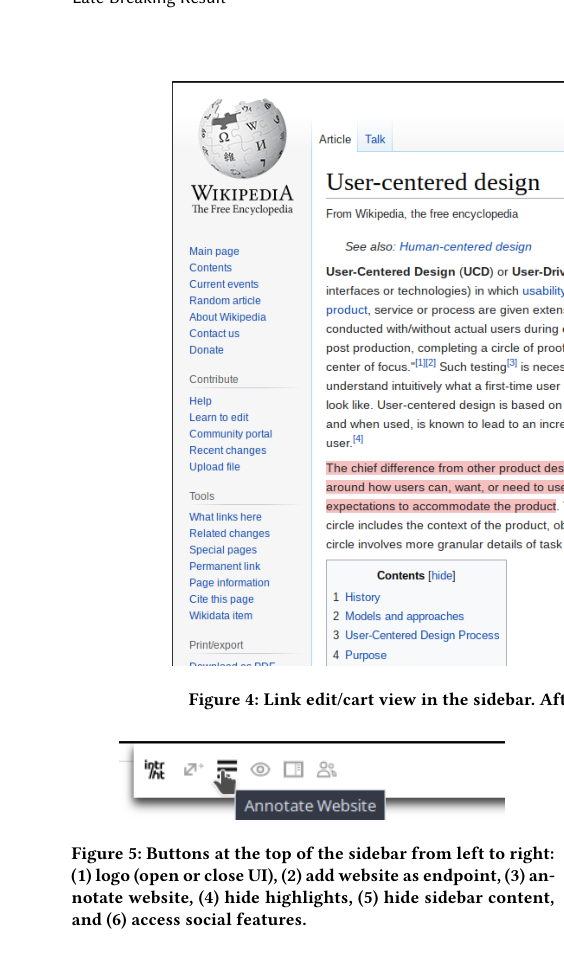
The process of link creation begins with creating an endpoint. Fig. 3 shows an example screenshot of this step. By default, this newly created endpoint is bidirectional, thus, is a starting point to other traversable endpoints and can be visited by others also. This makes it easy for novices to create working links, as they do not have to bother about the concept of endpoint/link direction. At this point there is just one endpoint, associated with a new, yet unsaved link. We follow a shopping cart metaphor, where the user can combine an arbitrary number of endpoints to a joint link, before saving it in the link base. The cart is shown in the (expanded) sidebar, as depicted in Fig. 4. There, a second, bidirectional endpoint is created on the Wikipedia page about “User-centered design”, anchored to a specific section. With pressing ‘Save’, the unsaved link with now two endpoints is stored. Of course, the user can add more endpoints before saving or at any later time by editing the link. The latter option loads an existing link into the cart, where (beside adding and deleting endpoints) it is possible to change their titles, descriptions or directions. Adding annotations works similar to adding endpoints (see Fig. 3), except that they are saved immediately after creation. As endpoints, annotations offer the user so set an optional title and description. Annotations are highlighted in a different color. If one
Late Breaking Result HT ’21, August 30–September 2, 2021, Virtual Event, Ireland
Demonstration of Weblinks: A Rich Linking Layer Over the Web HT ’21, August 30-September 2, 2021, Virtual Event, Ireland

wants to use the whole page as anchor for an endpoint or for annotation, corresponding buttons can be found at the top of the sidebar, as shown in Fig. 5.
4 Conclusion And Future Work
Weblinks is a Web browser plugin that enables the creation of links on arbitrary Web resources. While still under development, the current state of the plugin is used as a prototype for real world applications. While links created with the plugin are more powerful than ordinary URIs on the Web, its use turns out to be easy.
285
Regarding the future development, we plan to improve the integration of sharing, groups, and other social features. Furthermore, due to dynamic Web pages, anchor resolution is an error-prone process, as structural changes prevent the XPath selector to work properly. Sometimes this leads to dangling endpoints. Currently, we use the combination of various selectors2 and fallback methods to resolve anchors, however, further improvement is necessary. Future work also includes adding domain specific requirements. For example, experts in the legal domain requested versioning of links. This is based on the fact that legal texts frequently get updated. Thus, not only the content should then be versioned, but also links or annotations. Questions like “Should a link always point to the most recent document version?” or “How can we present the original created link in a way to the user such that it is distinguishable to versioned variant?” must be answered. Overall, Weblinks is a plugin that provides freedom of users with respect to creating links on arbitrary Web pages. With putting the focus on structure, it goes beyond the content-centric thinking in today’s Web context.
Acknowledgments
This publication is funded by the Bavarian State Ministry of Science and the Arts (grant ID “Kapitel 15 49 TG 73”). and the Freunde und Förderer der Hochschule Hof (grant ID “Digitalization in University Teaching Award 2018”).
2See https://www.w3.org/TR/annotation-model/#selectors
Late Breaking Result HT ’21, August 30–September 2, 2021, Virtual Event, Ireland
HT ’21, August 30-September 2, 2021, Virtual Event, Ireland Atzenbeck and Roßner

References
[1] Mark Bernstein. 2003. Collage, Composites, Construction. In Proceedings of the ACM Conference on Hypertext, Vol. 14. Association for Computing Machinery
286
(ACM), New York, New York, USA, 122–123. https://doi.org/10.1145/900051.900077 [2] Jay David Bolter and Michael Joyce. 1987. Hypertext and creative writing. In Proceeding of the ACM conference on Hypertext - HYPERTEXT ’87. Association for Computing Machinery (ACM), New York, New York, USA, 41–50. https: //doi.org/10.1145/317426.317431 [3] Robert Cailliau and Helen Ashman. 1999. Hypertext in the Web - a History. Comput. Surveys 31, 4 (12 1999), 35. https://doi.org/10.1145/345966.346036 [4] Frank Halasz and Mayer Schwartz. 1994. The Dexter hypertext reference model. Commun. ACM 37, 2 (2 1994), 30–39. https://doi.org/10.1145/175235.175237 [5] David E. Millard and Martin Ross. 2006. Web 2.0: Hypertext by any other name?. In Proceedings of the Seventeenth ACM Conference on Hypertext and Hypermedia, HT’06, Vol. 2006. ACM Press, 27–30. https://doi.org/10.1145/1149941.1149947 [6] Daniel Roßner, Claus Atzenbeck, and Daniel Urban. 2020. Weblinks: Augmenting Web Browsers with Enhanced Link Services. In Proceedings of the 3rd Workshop on Human Factors in Hypertext, HUMAN 2020. Association for Computing Machinery, Inc, New York, NY, USA, 1–5. https://doi.org/10.1145/3406853.3432663
Source and attribution
This complete-text import was reconstructed from the ACM Hypertext and Social Media 2021 proceedings PDF, 3465336.3475123.pdf (SHA-256 5a1d82e4d512af52e554bb0e1db2c98104890e5623617657abf02d446e1a767f). Copyright and licence information are preserved in the source. ACM publication authority for this proceedings import is recorded in ACM-AUTHORIZATION.md.
Do you like what you are reading? Subscribe to receive updates.
Unsubscribe anytime