
IA, not only AI
Published in HT '23: 34th ACM Conference on Hypertext and Social Media · DOI: 10.1145/3603163.3609036 · License: Copyright held by the owner/author(s) (no Creative Commons license)
Authors: Frode Hegland
Frode Hegland WAIS University of Southampton Southampton, UK frode@hegland.com
Abstract
This is a demo and overview of my work today, demonstrating my approach to what my mentor Doug Engelbart called ‘Intelligence Augmentation’(IA), as opposed to only following the ‘Artificial Intelligence’ (AI) approach. The work has been implemented on the macOS platform, by my independent software development company ‘The Augmented Text Company’, in the form of the text tool ‘Liquid’, the word processor ‘Author’ and the PDF viewer ‘Reader’, using Visual- Meta to embed and read rich metadata in an open and robust manner.
CCS Concepts
• AI • Hypertext / hypermedia
Keywords
Intellect Augmentation, Defined Concepts, Glossary, Views
ACM Reference format:
Frode Hegland. 2023. IA, not only AI. In 34th ACM Conference on Hypertext and Social Media (HT ’23), September 4–8, 2023, Rome, Italy. ACM, New York, NY, USA, 5 pages. https://doi.org/10.1145/3603163.3609036
1 Introduction
In early 2023 ‘The Independent’ newspaper writes that we need to “Halt development of new AI to protect humanity”[1]. I make the case that we cannot simply stop the development of computer technology–there are no mechanisms through which to do this, but we can and should utilise AI for Intelligence Augmentation (IA) to use my mentor Doug Engelbart’s terminology. As reported by Kevin Kelly in Out of Control [2], the issue is one of priorities: Marvin Minskya: “We are going to make machines intelligent!” Doug Engelbartb: “What are you going to do for people?” There are many areas where we can augment our intellect, where we can increase our capacity to understand, think and communicate. My work has been concerned with a very specific
aspect of augmentation, what Doug Engelbart referred to as ’symbol manipulation’: “For other than intuitional or reflexive actions, an individual thinks and works his way through his problems by manipulating concepts before his mind's eye. His powers of memory and visualisation are too limited to let him solve very many of his problems by doing this entirely in his mind” [4]. I refer to this as ‘interactive text’. Text can, and does augment our thinking [5], while authoring and when reading [6] as much as new mathematical notations makes further mathematical thinking possible [7]. Kevin Kelly puts it this way: “Write to discover what you think” [8]. Text thus is a tool for thought [9]. We now need to take text interactions much further. The great promise of digital text is in the interactions it promises and this is important because “perception is highly active” [10]. To perceive while learning, thinking and communicating is not a static act and digitally interactive text can provide affordances beyond what frozen substrates could, something envisioned even before digital text became a reality, in Vannevar Bush’s Memex, which provided a theoretical means to “tie items together” [11]. Similar to how politics is too important to be left to politicians, development of augmentation systems is far too important to leave to computer scientists and programmers–a full spectrum effort from all aspects of society is required–if we are to build the most powerful systems and not just those which benefit the developers. I have therefore been convening ‘The Future of Text’ Symposium over the last decade and published three books based on the three most recent years, also called ‘The Future of Text’ [12] composed of articles by a host of brilliant minds. Quite simply, dialog is necessary for everyone to develop deep and wide understanding of the problem space and potential for progress. However, as Alan Kay, who contributed to ‘The Future of Text’, famously saidc: “The best way to predict the future is to invent it.” We must experiment to experience. What I present here is my own effort over the years, of implemented software, to demonstrate a different point of view, a different approach to reading, writing and thinking with text.
2 Connected, Interactive Documents
What we experience when interacting with text is tied to the substrate. In general we currently have two avenues to choose from when it comes to digital text: Interactive server based HTML documents on the Web or Local ‘frozen’ PDF documents. Whereas the web is interactive and PDF more static, PDF is also more robust whilst the Web is more fragile [16]. One way to make PDF documents more interactive is by embedding more metadata to enable interactions which the academic community has expressed
value for [17] [18] though the cost is a concern. An approach to eliminating much of the cost is to retain metadata from the manuscript when exporting to PDF. This is the approach taken with Visual-Meta, the subject of my PhD thesis. Whereas a traditional book has a ‘Printer’s Page’ towards the front of the book with metadata, Visual-Meta’ is an appendix at the end of the document in a clearly readable format, using the BibTeX style, in a small font.
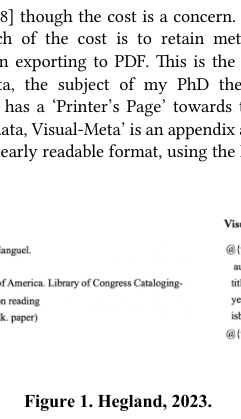
At the foundation of my personal perspective on the future of text is the simple premise that richer interactions demand richer data to interact with. From a document communication perspective, a medium for much of our academic and scientific discourse, this means both data and metadata. You can’t do anything if there is no data to hold onto, to interact with. Full Visual-Meta needs to be assigned by the authoring or publishing software but enough metadata to enable citing the document can be assigned after the fact, using the document’s DOI.
3 Information Flow
The software has the following flow: A user writes, thinks and edits in Author, then exports to PDF with Visual-Meta appended. The exported PDF then includes information to cite the document, the documents references, the structure of the document, endnotes and glossary. All of this is in plain text on the page so it remains compatible with ant PDF viewer software. When opened in Reader, the user now has an expanded set of affordances, as described below, including copying text from the PDF and pasting into a new Author document as a full citation. While in any macOS Application, the user can select text and issue a keyboard shortcut to launch Liquid, with the selected text copied into the interface, from where the moderately experienced user can launch any of over 300 commands instantly.
4 ‘Ask AI’ Command for IA
Access to AI implemented in Reader through a contextual menu and through the general text tool Liquid. Liquid was directly inspired by Engelbart’s NLS, though I did not realise this after building it. In NLS the user can, at any point while entering a command, enter a ‘?’ to which the system will respond with a list of all valid commands which can be chosen next. Liquid takes the opposite approach by listing all valid commands though a hierarchal menu but a skilled used can execute commands quicker than Liquid can display them, thus making this a reflection of NLS. The workflow in Liquid is for the user to select text, then invoke
Liquid (cmd-@ or user defined, such as cmd-space if the user removes Spotlight search) which will appear with the user’s selected text copied across. The user can now choose what type of command to carry out (fx; ‘A’ for ‘Ask AI’) and this then produces a sub-menu of options. The options are prompts which will be appended as prefixes to the selected text and be sent to the AI engine (initially GPT4) which then returns the results in a floating window for the user to interact with. This window is a normal text window which the user can dismiss or further interact with any text which appears. Using the initial keyboard shortcuts shown below (user can edit this), a sequence to have something explained in simpler language would be, on selecting text and spawning Liquid (something the users of Liquid’s 14,000 downloads will already have ‘in their fingers’): ‘a’ ‘e’. For the user to get a dialog to enter their own prefix prompt on the fly the user will simply need to do the keyboard shortcut ‘a’ twice.

Figure 2 shows the Liquid interface, with the selected text from the page–‘experience’–lifted into the Liquid interface. The ‘Ask AI’ command listed on the left of the interface, followed by the commands for Search, References, Convert and so on.
5 Interaction Paradigm : HUD & HOTAS
The software was designed to put information available at a glance and interactions at the user’s fingertips (primarily through keyboard shortcutsh). The model for this is a pilot who uses their hands to fly and their eyes to understand, as well as Doug Engelbart’s demo which Chuck Thackerd said was like watching him “dealing lighting with both hands”e. This reflects a pilot’s use of HUDs (Head Up Display) with HOTAS (Hands On Throttle And Stick) to experience and interact with the world. At this point we have a keyboard, pointing device (mouse or trackpad) and display (anything from a small 13” laptop display to 27” desktop) to interact with our text through, which is why the potential for VR to unleash the potential of interactive text is potential. Other specific interactions include getting the user into the flow of work through ESC to go in–and–out–of full screen, making a minimalist writing space/HUD much more accessible than hunting with the cursor for the full screen dot at the top of the window. When in full screen the author can paste text in the margins, which fades away when the cursor is moved away, as notes and reminders. The settings contains options for warm or cool colour themes and a slider to set the width of the writing column, allowing the user to seamless switch between thinner column reading modes and wide column edit modes, as would fit a small or large display.
Frode Hegland
6 Augmenting Scholarly Communication
‘Scholarly communication’, a term coined by the American Council of Learned Societies [20] for the social process mediated by documents [21] has more recently included calls for the process to be updated with more hypertextual interactions [22] [23] [24], a process hampered by scholarly practices of document presentation rooted in paper form which does not accept hypertextual affordances beyond basic Web Links, such as the document you are reading now. Current linking from documents are to Web servers, not other documents and citations remain manual chores with opportunities for errors at every step. Citing can be a chore for students in many software systems, but citations are what connects academic discourse, so I have invested considerable effort in making citing quick and easy but also less prone to error, and quick to access for the reader. In addition to citing books easily in Author, Visual-Meta enables citing a document through copy and paste.
7 Core Functions : Views
Core interactions in both Author and Reader (enabled in Reader through Visual-Meta) is Folding and Finding, in addition to other views, or ‘ViewSpecs’ in Doug Engelbart’s terminology: • Fold. Fold document into an outline with cmd-(minus). • Find. Selecting text and cmd-F results in only the sentences with the selected text appearing–all other text is hidden, along with headings so that the user can instantly see where a specific instance of the text appears. cmd-F again to dismiss this view or click on a sentence to jump to it. • Views. cmd-shift-N to see only the Names in the document (including headings–as with Find–for context), cmd-shift-D to see only Defined Concepts, or cmd-shift-B to fade any text which is not bold. Cmd-/ fades all paragraphs which do not have the cursors, for a focus view. • Highlighting. Select text and cmd-shift-H. On folding this text also appears.
8 Mapping Concepts in Author
Human thought can be considered as multidimensional as knowledge itself. It can be argued that academic discourse is based on linear arguments however–a student cannot simply drop a knowledge graph or a pile of index cards on the desk and call it an academic paper. Author allows the user to define concepts as they work, in order to help the user make their own thinking clear, in plain language, through selecting the text they want to define, cmd-D and writing their definition. When the user clicks on ‘Write/ Map’ at the bottom of the window (or toggle with cmd-M) they can see all the defined concepts, allowing the user to lay them out–in a ‘light’ form of spatial hypertext–to see how they group and cluster. To reduce the clutter of every defined concept/node being connected to every other, there are no connections shown by default. However, when selecting a defined concept, lines appears from the concept to any concepts which are contained in the defined
HT’ 23, September 2023, Rome, Italy
concept’s definition. For example: If the user has defined both ‘Ted Nelson’ and ‘Hypertext’ and included the sentence “Coined the term Hypertext” in the definition of Ted Nelson, then if the user selects ‘Ted Nelson’ on the map, a line would appear to Hypertext. If the user then points to the connective line, the reason for it appears, the sentence from the definition of ‘Ted Nelson’ which contained the term ‘Hypertext’: “Coined the term Hypertext”.
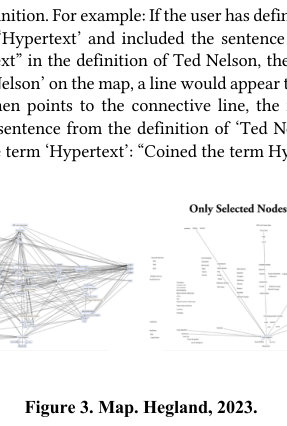
The process is designed to be fluid, where the user defines and checks their Map to see if connections make sense, then edits any concepts which needs it. Double-clicking on a concepts results in a Find operation, showing the user all the occurrences of that concept in the document, should they wish to jump to any. The potential is for the user to build a Map in their document and a Map in their minds simultaneously. To learn requires understanding connections and this approach augments the user’s ability to see and connect with the concepts in their work, scaffolding their learning and intuition.
9 Export to PDF with Visual-Meta
On export to PDF with Visual-Meta, automatically included is how to cite the document, structure (headings), Defined Concepts (as Glossary terms), as well as endnotes and references, including quotes and more information than would be allowed in a standard academic reference section. A standard academic Reference section is included along with citation numbering in the body of the text.
10 Reading in Reader
When opening a PDF exported with Visual-Meta, many of the same affordances in the authoring application become available in Reader. The Find command in a PDF with Visual-Meta has access to both the headings and the Glossary of the document, resulting in a regular search result plus a Glossary definition on top of the window if the text searched for has a Glossary definition. Any references to other Defined Concepts/Glossary terms, appear in bold, as in-document links, letting the user click on any to see their definitions, allowing them a hypertextual view of how the author has defended the terms in the document. Furthermore, if the user comes across a citation, they can click on it to see the full reference information and if they have the cited document on their computer, they can click on the reference to open the document instead of going to a download site, to the
correct page. If they do not have the document locally, the DOI URL will load.
11 In Closing
When it comes to augmenting our intellect, a lot more will be outsourced to AI in the future than it is now–or perhaps the term should be ‘delegated’–that much seems inevitable. We might also learn to outsource in ways inspired by the octopus’ tentacles which operate at a level of independence so far alien to us[25] in order to increase our depth of understanding.
12 In Opening
The future of interactive text can be as multidimensional as text itself is, and will most powerfully expressed and explored in VR/ AR environments and supported by AI enabled interactions based on available metadata. In order to unlock the tremendous potential of AI to truly augment us we need to unlock the door to a greater bandwidth of how we interact with AI. Voice and text chat interfaces are simply too constraining because they will not allow us to deeply interrogate and see the different aspects of the AI knowledge product. If Siri, Google or Alexa says that such a thing is such, we have very limited means to question it and look at alternatives. Therefore I believe the question of whether AI will make us interact with our information in more shallow ways or deeper, will come down to the bandwidth of the interface through which we will interact with AI. In a fully immersive environment, we do not have to only outsource thinking from our brains to AI, we will be able to move thinking out of the exclusive domain of the perspective that it only happens in the brain and accept and embrace how our full our bodies and environment is the space of thought. McLuhan wrote about seeing the future through a rear view mirror [26]. We are trying to see the future through small computer screen rectangles– when we unleash the full space and allow ourselves to think with all our faculties, we will be truly augmented. However, if we are clever enough, and if we work well enough together, we can truly unleash the power of AI to augment how we think and communicate, using VR as the medium through which we extend our minds. For more information, the software, including demos, is available from https://www.augmentedtext.info/ and The Future of Text initiative, with links to the books and the Symposium, is available at https://thefutureoftext.org/
ACKNOWLEDGMENTS My thanks for this work goes to family and advisors at the University of Southampton, Professor Les Carr and David Millard, as well as the programmer of Author, Jacob Hazelgrove and the producer of later versions of Reader, Roman Solodovnikov. This paper is dedicated to my friend and former professor Ed Leady, who taught me that the future of text is continuing to ask what the future of text is.
References
1 Griffin, A., Halt development of new AI to protect humanity: Chilling call by Elon Musk and tech titans. 2023. https://www.independent.co.uk/tech/aiartifiical-intelligence-elon-musk- letter-b2309980.html. [Accessed 30 03 2023]. 2 Kelly, K., Out of Control: The New Biology of Machines, Social Systems, & the Economic World. 1995. Basic Books 3 Sebastian, S., Connectome. 2012. Mariner Books 4 Engelbart, D., Program On Human Effectiveness. 1961. https://www.dougengelbart.org/pubs/white-papers/1961-Program-On- Human- Effectiveness.pdf. [Accessed 19 06 2023]. 5 Menary, R., Writing as thinking in Language Sciences. 2007. DOI: https:// doi.org/10.1016/j.langsci.2007.01.005. 6 Betts, E., Reading Is Thinking in The Reading Teacher. 1959. https:// www.jstor.org/stable/ 20197160. [Accessed 12 06 2023]. 7 Cajori, F. 1923. The History of Notations of the Calculus in Annals of Mathematics Annals of Mathematics, 8 Kelly, K. 2023. Excellent Advice for Living. Penguin. 9 Iverson, K., Notation. 1979. https://numinous.productions/ttft/assets/ Iverson1979.pdf. [Accessed 13 06 2023]. 10 Hickok, G. 2014. The Myth of Mirror Neurons. National Geographic Books. 11 Bush, V., As We May Think. 1945. https://www.theatlantic.com/magazine/ archive/1945/07/as-we-may-think/303881/. [Accessed 22 05 2023]. 12 Hegland, F., The Future Of Text. 2020. London, UK. DOI: 10.48197/fot2020a. 13 Anon, Who Created the PDF?. 2015. https://theblog.adobe.com/who-created- pdf/. [Accessed 17 08 2021]. 14 Anon, What is PDF?. 2021. https://www.adobe.com/uk/acrobat/about-adobepdf.html. [Accessed 27 03 2023]. 15 Warnock, J., The Camelot Project. 1990. https://www.pdfa.org/norm-refs/ warnockcamelot.pdf. [Accessed 25 03 2023]. 16 Wulff, B., Adobe Acrobat at 20: Successes, Second Guesses and a Few Miscues. 2013. https:// knowledge.wharton.upenn.edu/article/adobe-acrobat-at-20-successessecond-guesses-and-a-few-miscues/. [Accessed 05 04 2023]. 17 Miller, S. 2022. Metadata for Digital Collections. American Library Association. 18 Haynes, D. 2018. Metadata for Information Management and Retrieval. Facet Publishing. 19 Bruce, T. & Hillmann, D., The Continuum of Metadata Quality: Defining, Expressing, Exploiting. 2004. https://ecommons.cornell.edu/handle/1813/7895. [Accessed 17 06 2023]. 20 Ekman, R. & Quandt, R. 1999. Technology and Scholarly Communication. Univ of California Press. 21 Borgman, C., Digital libraries and the continuum of scholarly communication in Journal of Documentation. 2004. DOI: 10.1108/EUM0000000007121. 22 Brembs, B., Why Academic Journals Need to Go. 2018. http://bjoern.brembs.net/2018/01/why-academic-journals-need-to-go/. [Accessed 20 08 2020]. 23 Gonzalo, J. & Thanos, C. & Verdejo, F. & Carrasco, R. 2006. Research and Advanced Technology for Digital Libraries. Springer. 24 Schonfeld, R., Meeting Researchers Where They Start. 2016. New York. DOI: 10.18665/sr.241038. 25 Godfrey-Smith, P. 2017. Other Minds. Farrar, Straus and Giroux. 26 McLuhan, M. 1997. Forward Through the Rearview Mirror. Mit Press.
Endnotes
a “Marvin Minsky was an American cognitive and computer scientist concerned largely with research of artificial intelligence (AI), co-founder of the Massachusetts Institute of Technology's AI laboratory, and author of several texts concerning AI and philosophy.” https://en.wikipedia.org/wiki/MarvinMinsky b “Douglas Engelbart was an American engineer and inventor, and an early computer and Internet pioneer. He is best known for his work on founding the field of human–computer interaction, particularly while at his Augmentation Research Center Lab in SRI International, which resulted in creation of the computer mouse, and the development of hypertext, networked computers, and
precursors to graphical user interfaces. These were demonstrated at The Mother of All Demos in 1968.” https://en.wikipedia.org/wiki/DouglasEngelbart I asked Doug about this exchange with Marvin Minsky, and he said, to his memory, it did not happen exactly as conveyed here, but it does capture their positions. c Though he was not the originator of the quote. https://www.parc.com/blog/thebest-way-to-invent-the-future-is-to-predict-it-2/ d https://medium.com/figma-design/figmas-new-finger-tips-b463bfdf14d7 e Doug Engelbart sat under a twenty-two-foot-high video screen, "dealing lighting with both hands." At least that's the way it seemed to Chuck Thacker, a young Xerox PARC computer designer who was later shown a video of the demonstration that changed the course of the computer world. He would later go on to design the Xerox Alto, which is the first computer that used a mouse-driven graphical user interface.
https://en.wikipedia.org/wiki/CharlesP.Thacker
Do you like what you are reading? Subscribe to receive updates.
Unsubscribe anytime